
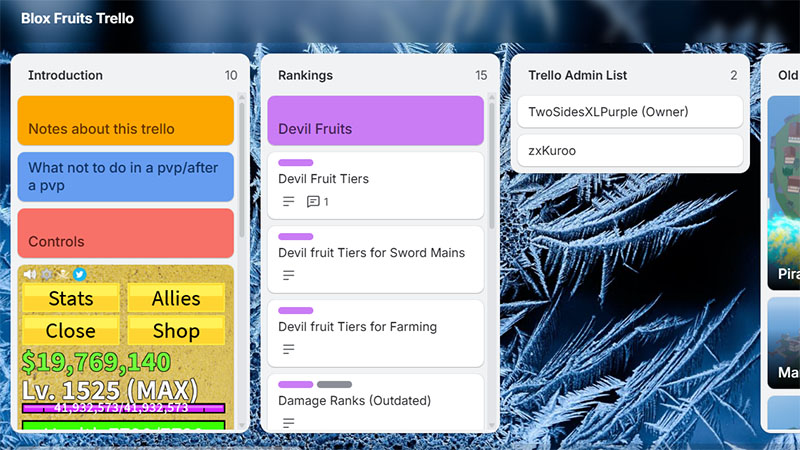
Blox Fruits Trello Link is the easiest way to access the official Blox Fruits Trello board, where you’ll find accurate and up-to-date information about every part of the game. Instead of searching through multiple websites, you can use the Trello board to learn about Fruits, Swords, Fighting Styles, Bosses, NPCs, Islands, Races, Materials, Raids, quests, and the latest updates. Whether you’re a beginner or an experienced player, the Trello link helps you find the information you need quickly and progress through the game more efficiently.
-> Blox Fruits Trello Link: https://trello.com/b/imb75BzG/blox-fruits-trello
What is Trello Blox Fruits Link?
The Blox Fruits Trello link gives players access to the official Trello board, where they can find up-to-date information about the game. It includes guides for Fruits, Swords, Fighting Styles, Bosses, NPCs, Islands, Races, Materials, Raids, quests, and the latest game updates, making it a valuable resource for both new and experienced players.
Trello Blox Fruits User Guide
The Blox Fruits Trello board is designed to help players quickly find accurate information about every aspect of the game. Whether you’re a beginner or a veteran, learning how to navigate the board will save you time and make leveling up much easier.
1. Open the Official Trello Board
Visit the official Blox Fruits Trello board using your web browser. You don’t need a Trello account to view the information, although signing in allows you to bookmark the board for quick access.
2. Browse the Trello Lists
The board is divided into multiple columns, with each list covering a different topic. Common categories include:
- Fruits
- Fighting Styles
- Swords
- Guns
- Accessories
- Races
- NPCs
- Bosses
- Islands
- Materials
- Raids
- Events
- Game Updates
Simply scroll horizontally to explore each category.
3. Use the Search Feature
If you’re looking for a specific item, press F on Trello or use your browser’s Ctrl + F (Cmd + F on Mac) to search for keywords such as:
- Dough
- Kitsune
- Dragon
- Cursed Dual Katana
- Leviathan
- Soul Guitar
This is the fastest way to locate a specific card.
4. Open Cards for Detailed Information
Click any card to view detailed information, including:
- Description
- Requirements
- Abilities
- Damage or stats
- Locations
- NPCs involved
- Quest requirements
- Upgrade materials
- Images and illustrations
Many cards also contain links to related content.
5. Check Island Progression
Use the Islands section to learn:
- Recommended level ranges
- NPC locations
- Boss locations
- Quest objectives
- Spawn points
- Travel routes
This helps players know exactly where to level up next.
6. Learn About Bosses and NPCs
Boss cards usually include:
- Spawn location
- Level requirement
- Respawn time
- Rewards
- Drops
- Quest information
NPC cards explain what services each NPC provides, such as awakening Fruits, resetting stats, changing races, or crafting items.
7. Stay Updated
The Trello board is updated whenever major content is released. Visit it after each game update to learn about:
- New Fruits
- Balance changes
- New islands
- New weapons
- Events
- Limited-time content
- Patch notes
What’s on Blox Fruits’s Trello board?
The Blox Fruits Trello board is the official community resource that contains almost everything players need to know about the game. It serves as a complete encyclopedia, covering all Blox Fruits, Fighting Styles, Swords, Guns, Accessories, Races, Haki, and NPCs. Players can also find detailed information about every island across the First Sea, Second Sea, and Third Sea, including quest givers, enemies, bosses, level requirements, and important locations.
In addition to game content, the Trello board explains many of the game’s core mechanics, such as Raids, Awakenings, Enchantments, Trading, Crafting, Materials, Titles, Events, and Codes. It is regularly updated with new features, balance changes, and update notes, making it one of the most reliable resources for both beginners and experienced players who want to progress efficiently and stay informed about the latest content in Blox Fruits.
Read more: Anime Adventures Trello