
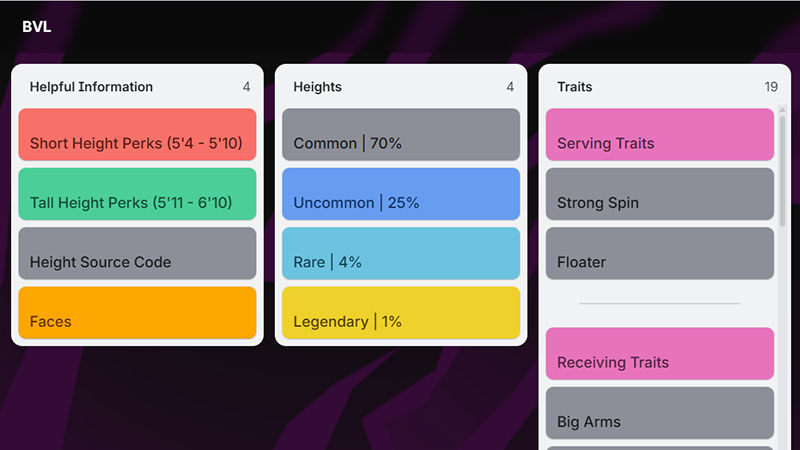
The Beyond Volleyball League Trello is worth checking because it brings important game information into one convenient place. Whether you are a new player learning the basics or an experienced player looking to improve your build, the Trello board can help you quickly find details about Traits, Specs, controls, items, maps, and other gameplay mechanics.
-> Beyond Volleyball League Trello Link: https://trello.com/b/D4GwT1Zi/bvl
What is Trello Beyond Volleyball League Link?
The Beyond Volleyball League (BVL) Trello Link is the official Trello board for the Roblox game Beyond Volleyball League. It provides players with a convenient place to find game-related information, including mechanics, traits, specs, controls, maps, items, and other useful details.
Trello Beyond Volleyball League User Guide
To use the board, open the BVL Trello and browse through the available lists and cards. Select a card to read its detailed information, such as gameplay mechanics, Traits, Specs, items, maps, controls, and other game-related details. For gameplay practice, you can also use the controls listed in Roblox: G to spawn the ball, V to serve, T to sprint, Q/E to adjust power, F/R to set forward/backward, 3 to dive, 1 to switch between spiking and blocking, and B to activate trait abilities.
What’s on Beyond Volleyball League’s Trello board?
The Beyond Volleyball League (BVL) Trello board serves as a central reference hub for the Roblox volleyball game, providing useful information about gameplay, player progression, and game mechanics. It helps both new and experienced players understand how BVL works and improve their overall gameplay.
Based on the available information, the board covers:
- Gameplay Guides – Information to help players understand the core mechanics and features of BVL.
- Traits – Details about different traits and how they affect your player.
- Specs – Information about player specifications and builds for different playstyles.
- Tier Lists – Rankings that help players compare traits, specs, and other gameplay elements.
- Items – Information about available items and their purposes.
- Maps – Details about the game’s maps and playable areas.
- Controls – Keybinds and controls for actions such as serving, receiving, spiking, blocking, diving, sprinting, and setting.
Read more: Fairy Tail Re Trello